Your Aadhaar e-KYC integration probably trusts unsigned data

If your app accepts Aadhaar Offline e-KYC, there’s a good chance it reads the XML and moves on. The name, date of birth, address and photo go straight into your database.
The XML is just a file. Anyone can change it.
UIDAI signs every Offline e-KYC document so you can tell a genuine file from an edited one. Checking that signature is the whole point of the format, and it’s the step most integrations skip.
What’s in an Offline e-KYC file
A resident downloads a ZIP from the UIDAI website and protects it with a 4-digit share code. Inside is one XML file: the resident’s name, date of birth, gender, address, photo, hashes of their mobile number and email, and a reference ID made of the last four digits of their Aadhaar number and a timestamp.
At the end of the XML sits an XML digital signature. It covers the whole document. Change one character anywhere and the signature no longer matches.
The same applies to vendor flows: many KYC vendors return this signed XML from their OTP-based APIs. If you store or act on it without checking the signature, you trust the vendor, the network and everything in between.
Show it
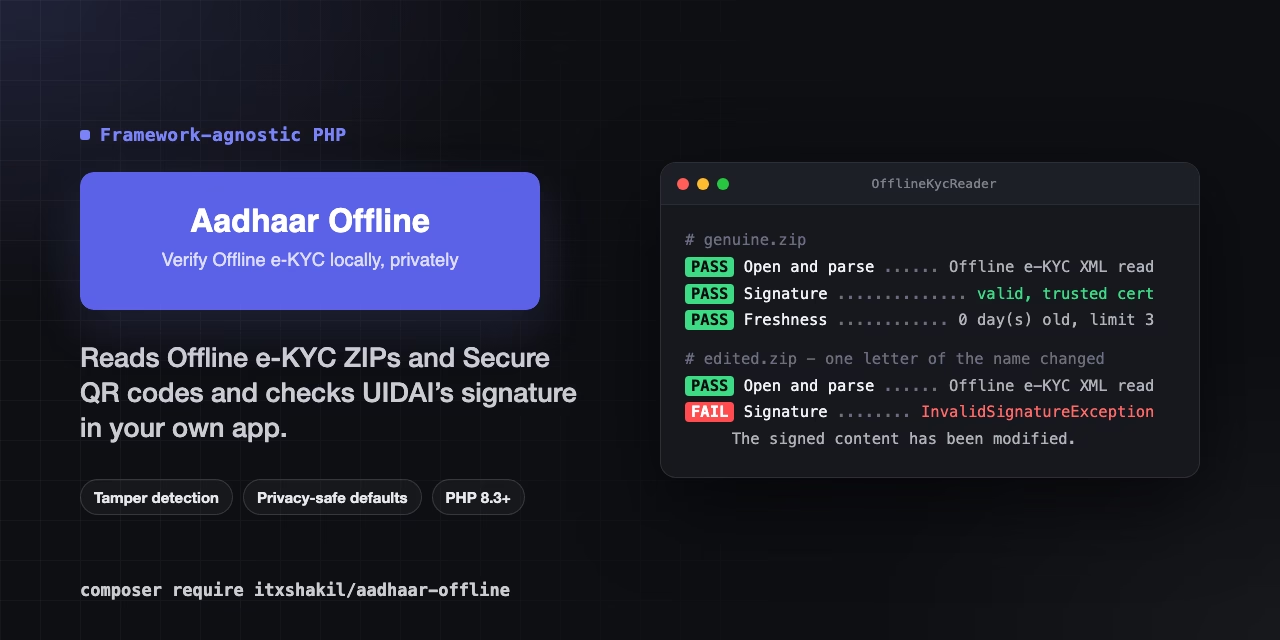
Here’s a genuine file and the same file with one letter of the name changed. The package’s check command prints only masked, structural output:

The edited file still opens. It still parses. Only the signature check notices.
How verification works
The signature is an enveloped XML-DSig with a single reference covering the whole document. To verify it you need UIDAI’s public certificate, and this is where many hand-rolled checks go wrong:
- Never verify with the certificate inside the document. The XML carries a copy in its KeyInfo element. A forger can replace it with their own certificate and sign the edited file with their own key. If you verify against the embedded certificate, the forgery passes.
- Pin the certificate yourself. Download it from UIDAI’s Data and Downloads page, compare its SHA-256 fingerprint, and configure it.
- Expect rotation. UIDAI started signing with a new certificate in February 2026 (“DS Unique Identification Authority of India 06”). Keep the old one listed during a rotation.
The package also checks structure before cryptography: exactly one signature, directly under the root, with one reference covering the whole document. That rules out signature-wrapping tricks, where a valid signature covers a different part of the document than the one you read.
Secure QR codes
The QR code on Aadhaar letters, PVC cards and e-Aadhaar PDFs is the same idea in a different shape. The QR text is one very large decimal number. Converted to bytes, it’s a GZIP stream; decompressed, it’s a list of fields separated by 0xFF bytes, then the photo, then a 256-byte RSA signature over everything before it.
Two details matter:
- The photo is JPEG 2000 and can contain 0xFF bytes itself, so you can’t simply split on the delimiter.
- QR layouts have changed over time (V2, V3, V5). The package rejects versions it doesn’t know instead of guessing, because a misread layout would still pass the signature check and give you the wrong data, marked as verified.
Privacy by default
Aadhaar data is regulated, and the DPDP Act raises the stakes for leaks. The package’s defaults are designed not to make things worse:
- the full Aadhaar number is never part of the result, only the last four digits
- toArray(), JSON and dumps leave out the share code, hashes and raw XML
- exception messages and events contain no personal data
- the photo stays in memory unless you store it on a private disk
Testing without real data
You should never commit a real Aadhaar file, even your own. The core package ships test helpers that generate a key pair at runtime and build signed ZIPs, XML and QR codes in the exact UIDAI shapes:
$reader = OfflineKycReader::create([Fixtures::certificateFile()]);
$reader->verifySecureQr(Fixtures::secureQr(['name' => 'Ravi Kumar']));
Get started
For Laravel:
composer require itxshakil/laravel-aadhaar-offlineFor any PHP 8.3+ app:
composer require itxshakil/aadhaar-offlineBoth are MIT-licensed and at 0.x. They’ve been tested against a real 2026 Offline e-KYC download. If you use vendor XML or Secure QR codes in production, I’d love to hear whether they verify for you.
- Laravel: https://github.com/itxshakil/laravel-aadhaar-offline
- Any PHP: https://github.com/itxshakil/aadhaar-offline
This project is not affiliated with or endorsed by UIDAI.