Collaboration That Doesn’t Create Chaos

Part 4 of the Git Mastery Series
← Part 3: Branching Without Fear | Part 5: Git as Your Safety Net →
The first time you work on a shared repository with a team, Git feels entirely different. Suddenly the stakes are higher. You’re not just managing your own work — you’re touching code other people depend on, potentially rewriting history they’ve already pulled, or introducing changes that conflict with what someone else spent the day building.
Most Git problems on teams aren’t technical. They’re coordination problems that Git reflects back at you. The branch with 47 commits that’s been open for three weeks. The merge that had 12 conflicts because two developers refactored the same file in parallel without knowing it. The force push that rewrote history on a shared branch and caused chaos for the rest of the team.
These situations all had a Git solution. But the solution was mostly about communication and process, not commands.
The Pull Request Isn’t a Formality
A lot of teams treat pull requests as a checkbox — open it, someone clicks “approve,” merge it. The code review is cursory. Feedback is minimal. “LGTM” appears within minutes on PRs that contain hundreds of lines of changes.
This is a missed opportunity. A pull request is the best point in the entire development process to catch problems — not just bugs, but design issues, architectural drift, security vulnerabilities, and code that technically works but will be unmaintainable in six months.
The problem is that most PRs aren’t designed to be reviewed. They’re designed to be merged.
What a reviewable PR looks like:
The title is specific: feat(checkout): add Razorpay payment gateway integration not payment stuff.
There’s a description that answers: what does this PR do, why was it needed, how should the reviewer test it, and is there anything specific you want feedback on?
The commits tell the story of what was built — not just what you happened to type while building it. (This is why Part 2 matters.)
The PR is a size a human can actually review in 30–60 minutes. If it’s 2,000 lines of diff, it’s not a PR — it’s a project. Break it up.
## What does this PR do?
Integrates Razorpay as a payment gateway option for checkout.
Previously we only supported Stripe.
## Why?
Multiple users in India reported Stripe charges in USD are
causing currency conversion frustration. Razorpay handles INR natively.
## How to test
1. Set RAZORPAY_KEY_ID and RAZORPAY_KEY_SECRET in .env (test keys in 1Password)
2. Add an item to cart and proceed to checkout
3. Select "Pay with Razorpay"
4. Use test card: 4111 1111 1111 1111
## Notes for reviewer
The webhook handling in PaymentController is the most complex part.
I'd appreciate extra eyes on lines 87-134.
Closes #312
That takes five minutes to write and saves the reviewer twenty minutes of confusion. It also forces you to think about whether what you built is actually what was needed.
Keeping Your Branch Current Without Creating a Mess
The longer your feature branch lives, the further it drifts from main. Merge conflicts get worse the longer you wait. Changes other people made become harder to reconcile.
The habit: update your branch from main regularly. Every day, or whenever something relevant lands on main.
Two ways to do this:
Rebase onto main (preferred for feature branches):
git switch feature/my-feature git fetch origin git rebase origin/mainYour commits get replayed on top of the latest main. Your branch history stays clean. When you eventually merge, it’s a fast-forward. No merge commit, no noise.
Merge main into your branch (simpler but messier):
git switch feature/my-feature
git merge main
This creates a merge commit on your feature branch every time you do it. If you update three times before merging, you have three merge commits on a feature branch. The history becomes confusing. Prefer rebase for this specific operation.
One important rule: if your branch is shared with other developers — if someone else has pulled it and is working from it — don’t rebase. Rebasing rewrites commit hashes, which means anyone who has your old commits now has conflicts with the new ones. On shared branches, merge instead.
Protected Branches and Why “No Direct Push to Main” Is a Feature
Most teams eventually learn this lesson the hard way: a direct push to main that breaks the build on a Friday afternoon.
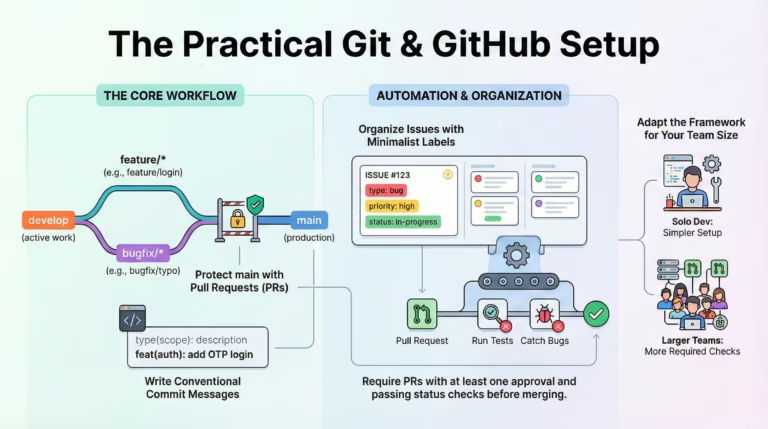
Branch protection rules exist to make mistakes hard by default:
- Require pull requests before merging
- Require at least one approval
- Require CI to pass before merging
- Prevent force pushes on main
Setting these up on GitHub or GitLab takes five minutes and prevents a category of incidents that are otherwise entirely predictable.
Settings → Branches → Branch protection rules
The mindset here: protection rules aren’t about distrust. They’re about creating a system where good practices are automatic and mistakes require deliberate effort to make. A team that needs protection rules isn’t a bad team — it’s a team that understands that humans make mistakes under pressure and has designed for that.
Force Push: When It’s Right and When It’s Wrong
git push --force has a reputation as a dangerous command, and it deserves it in the wrong context. But in the right context, it’s completely normal.
When force push is right: after rebasing or amending commits on your own feature branch that nobody else has pulled. You’ve rewritten local history and need to update the remote to match:
git rebase -i HEAD~3  # Clean up commits
git push --force-with-lease origin feature/my-feature
Note --force-with-lease instead of --force. This is strictly safer — it refuses to force push if someone else has pushed to the branch since you last fetched. It protects against accidentally overwriting someone else’s work on a shared branch.
When force push is wrong: on main, develop, or any branch other people are working from. Rewriting shared history is how you get frantic Slack messages and conflicts everyone has to manually resolve.
Simple rule: force push only on branches you own. Never on shared branches. If you’ve accidentally pushed something to a shared branch that needs to be removed — bad credentials, sensitive data, large binary files — have a team conversation before force pushing.
Git Hooks: Automation That Enforces Standards
Git hooks are scripts that run automatically at specific points in the Git workflow. They’re one of the most powerful and underused features for teams.
Useful hooks for shared work:
pre-commit: runs before a commit is finalized. Use it to run linters, check for debug statements, validate commit message format:
#!/bin/sh
# .git/hooks/pre-commit
npm run lint
if [ $? -ne 0 ]; then
  echo "Linting failed. Fix errors before committing."
  exit 1
ficommit-msg: validates the commit message format:
#!/bin/sh
# .git/hooks/commit-msg
commit_regex='^(feat|fix|refactor|docs|test|chore|perf)(\(.+\))?: .{1,72}'
if ! grep -qE "$commit_regex" "$1"; then
  echo "Commit message doesn't follow Conventional Commits format."
  echo "Example: feat(auth): add OTP login"
  exit 1
fipre-push: runs before pushing to remote. Good for running tests:
#!/bin/sh
# .git/hooks/pre-push
npm test
if [ $? -ne 0 ]; then
  echo "Tests failed. Fix them before pushing."
  exit 1
fi
The problem with .git/hooks is that it’s not committed to the repository — every developer has to set it up manually. For shared hooks, use a tool like Husky (JavaScript projects) or Lefthook (language-agnostic) that stores hooks in the repo and installs them automatically.
The mindset: hooks remove the “I forgot” category of mistakes. Nobody remembers to run the linter before every commit. A hook that does it automatically means the standard is enforced without depending on anyone’s memory.
When History Goes Wrong on a Shared Branch
Sometimes, despite good practices, something bad lands on a shared branch. A commit with credentials. A merge that introduced a regression. A massive binary file that shouldn’t have been committed.
Reverting vs resetting:
git revert creates a new commit that undoes the changes of a previous commit. It doesn’t rewrite history — it adds to it. This is the safe option for shared branches:
# Undo the last commit while preserving history
git revert HEAD
git push origin main
# Undo a specific commit further back
git revert a3f8c9d
git push origin main
git reset moves the branch pointer backward, effectively removing commits from the visible history. This is only safe on branches you haven’t shared:
# Undo last commit (keep changes in working dir)
git reset HEAD~1
# Undo last commit completely
git reset --hard HEAD~1
The rule: on shared branches, revert. On private branches, reset.
Tagging: The Commit History Entry Nobody Writes
Tags are a lightweight way to mark important points in history — releases, milestones, deployment checkpoints. Most teams skip them. The teams that use them find them invaluable for production debugging.
# Create a release tag
git tag -a v1.2.0 -m "Release version 1.2.0"
git push origin v1.2.0
# Push all tags
git push origin --tags
# See all tags
git tag
# See what changed between releases
git diff v1.1.0 v1.2.0
git log v1.1.0..v1.2.0 --oneline
When something breaks in production, git diff v1.1.0 v1.2.0 shows you exactly what changed between the version that worked and the version that didn’t. Without tags, you’re guessing which commits were in which release.
The Collaboration Mindset
Working on a shared repository is a form of communication. Every commit, PR, and branch name is a message to your team. Code that works but is unreadable is a burden. A PR that can’t be reviewed is a bottleneck. A force push on main is an interruption to everyone.
The developers who collaborate well with Git aren’t the ones with the most commands memorized. They’re the ones who think about how their work will land for everyone else. Small PRs that are easy to review. Clear commit messages that explain decisions. Branches that are cleaned up after merging. History that tells the story of how the product was built.
That history outlasts everyone on the team. Write it accordingly.
Quick Reference
# Update feature branch from main (clean)
git fetch origin
git rebase origin/main
# Force push safely after rebase
git push --force-with-lease origin feature/branch
# Undo a commit on a shared branch (safe)
git revert HEAD
git push origin main
# Create and push a release tag
git tag -a v1.2.0 -m "Release 1.2.0"
git push origin v1.2.0
# See what changed between releases
git diff v1.1.0 v1.2.0
# See commits not yet in main
git log main..feature/branch --oneline
# Check what you're about to push
git diff origin/main..HEAD
← Part 3: Branching Without Fear | Next: Part 5 — Git as Your Safety Net →
If this was useful, I turned the whole series into a 23-page PDF reference — checklists, hook templates, 80+ commands, reflog & bisect deep-dives, and a recovery playbook for 12 real emergencies.


4 Comments